Synth Aesthetics - A Dawless Perspective - Part 4
Part 4 - Synth Aesthetics
Hello friends, welcome back. Last time, in A Dawless Perspective Part 3, I introduced concepts
regarding how the limitations of our personal environments shape our musical output. This is
especially interesting to us as dawless musicians as we are the ones who ultimately craft our
musical environments, to a point anyway. The constraints in which dawless music happens are by
our hand and our hands alone. And by that token, the environment we craft for our music is as
much of the art as the music itself.
Today we will explore ways we can better understand the dawless musical environment, aka the rig.
As we make decisions for our rig, even small technical decisions will alter our musical output to
some degree. The more decisions we make, the more we define our own system of musical
limitations and... our sound.
Systems & Constraints
When it comes to dawless music, I personally refer to these limited musical environments as
systems of constraints. I add the word system to reflect the notion that the constraints we’re
working within have relationships with other constraints. In these systems we can’t always consider
a given constraint in isolation, but rather we should consider these intra-system relationships in our
decision making. Altering one constraint may change the system in ways that are hard to predict.
That’s not to say every decision requires some level of complex thinking, but I do think it is important
to keep in mind our musical gestalt.
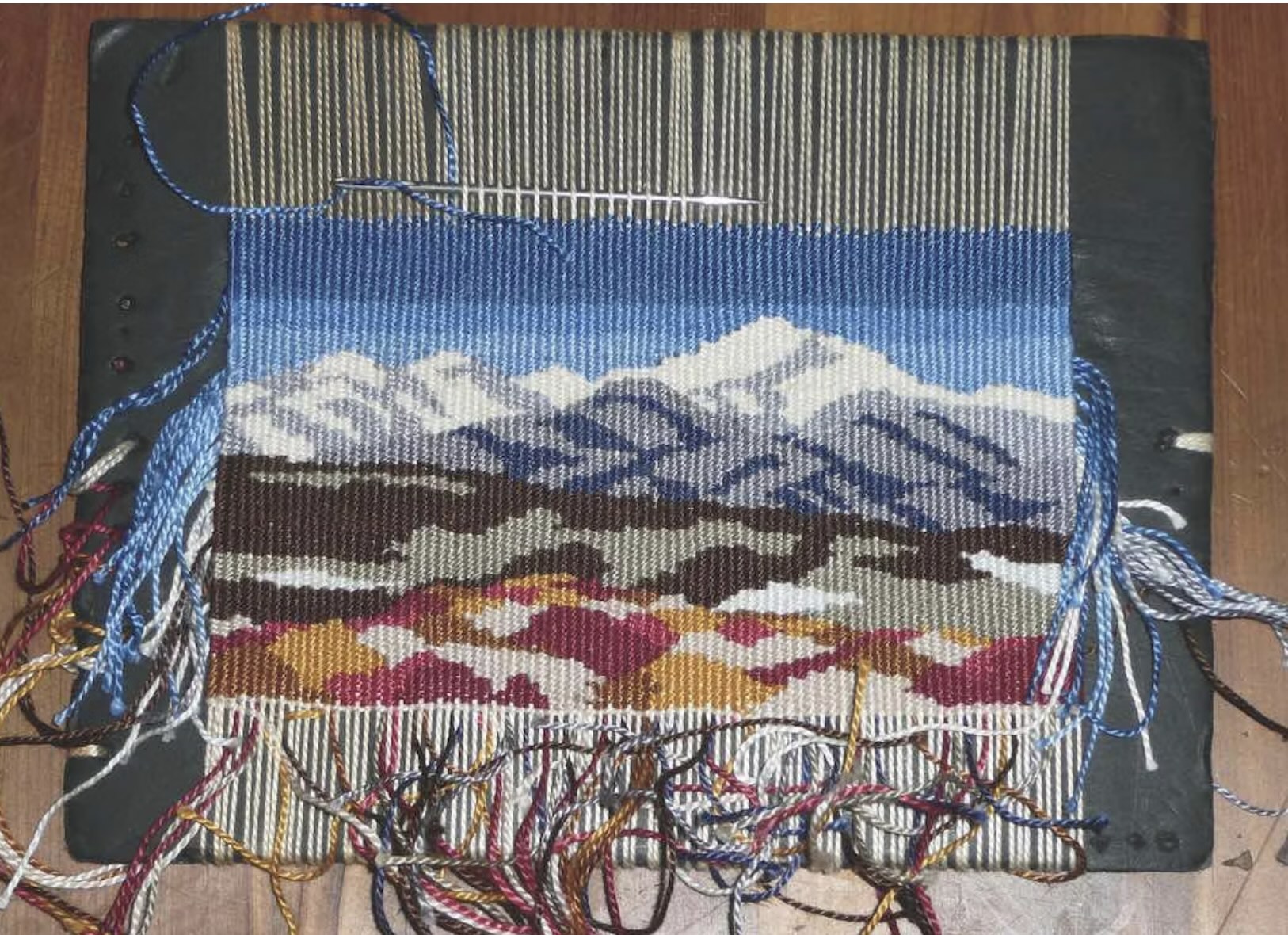
You never know what happens when you pull that thread. Worst case the entire tapestry comes
apart so be careful.
That said, we haven’t really unpacked the word constraint, which is really what I want to talk about
in the context of dawless music. Historically limitations were something that simply “existed” for a
musician. We’ve seen these constraints present themselves as venues (Byrne’s principle
example). A Dawless Perspective Part 3 also included a tale where limited access to technology
(and records) participated in hiphop’s genesis. There are countless other stories of an artist’s finite
environment inspiring amazing sounds. But what happens when we the musician is in control of
these constraints? What happens when the composer is the architect of one of these so-called
“systems”?
Every decision we make adds to our system of constraints, constraints that are most certainly
enforced. Enforced by whom? Well, stuff like reality, physics, capacitors and then some. Every
instrument, sequencer, controller, mixer, and even the configuration choices we make in our rig is all
right here, in real life, not taking any of our crap. That Moog in your rig, well it’s a Moog, it’s gonna
sound like a Moog and sound-design like a Moog. Your Digitone will sound and work like a
Digitone. The Squarp Pyramid sequencer has opinions about how you will sequence, opinions you
will heed. There are a lot of details, they all matter, they are part of your sound.

Lots of details, lots of constraints, buried in every decision you make. Consider hardware MIDI.
This is an image of a MIDI cable, it uses 3 of 5 of those pins to send 8-bit music messages to synths
and other gear. Some folks came up with this idea in the early 80’s and it hasn’t really changed
much since. It works how it works, but how do you make it work for you?
MIDI provides a great example of its own limitations influencing musical output. Working with MIDI
in real-life has limitations you wouldn’t find working with MIDI in a DAW. Consider automation data,
particularly situations where your sequencer sends a lot of it all at once. As this continuous control
data floods your midi network this can delay delicate time-sensitive control signals like clock pulses
causing jitter which messes up your whole performance. This is just one example, there’s plenty
more for you to discover, for better or for worse.
We’re going to make lots of decisions that affect our music – instruments, cabling, configuration
choices and yes, even how devices communicate. Each of these decisions we make brings to light
real world constraints, constraints that require (to a point) our adherance. The more constraints we
bring into the system the more unique, and potentially complex, that musical system becomes. That
musical system will arbitrate our music output. Each decision we make, even the technical ones,
may as well be a note in our upcoming electronic opus.
Who knew you could compose music just by how you hook up your synths? I mean I did, but let’s
dig a little deeper and see if I can’t drive this point home.
Instruments: The Core Aesthetic
When the dawless musician writes music, much like a rock band, their entire live set or body of work
is confined to the environment that they themselves have created and that environment has a unique
musical range. If the musician changes that environment, their music is fundamentally altered.
Dawless is immediate, present, and only exists in the right here, right now, and right in front of you.
When we choose instruments, choose how to hook them up, and choose which features we will or
won’t use, we’re creating a specific aesthetic; an aesthetic that only exists for this current iteration of
our rig and one that will never exist again as soon as you change something. The instruments, gear,
and choices you make in your rig are your sound. This is a sonic system of constraints that you
have engineered and it produces a particular synthetic aesthetic, yours. Finding and flexing the
boundaries of that system is the fun part.
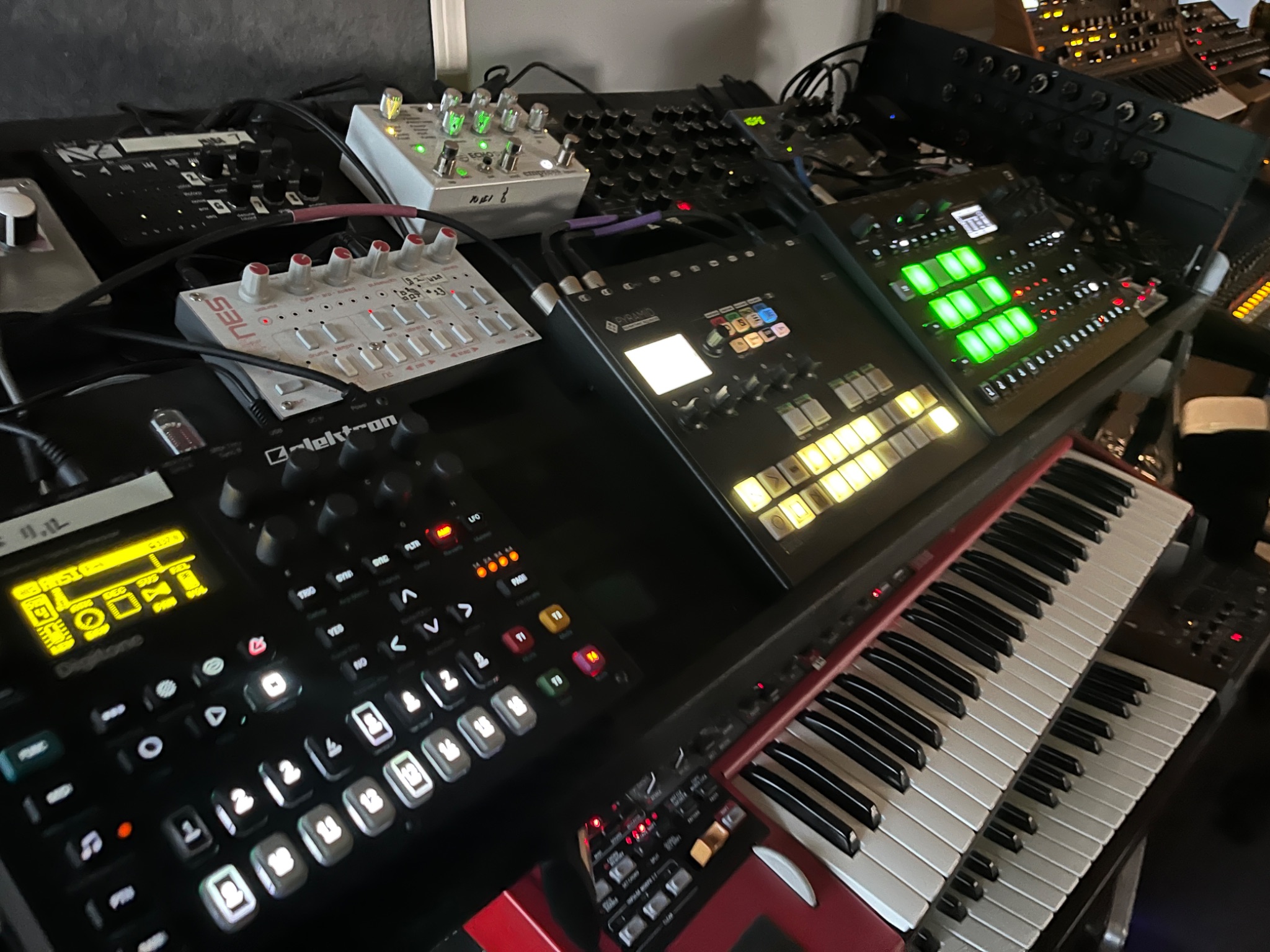
It’s not just stuff, this is your band. There’s a lot of opinions.
Each instrument (synth, sampler etc) in your dawless rig is like a player in a band; a player who
probably only knows how to plays one or two instruments: Eddie plays guitar, Michael plays Bass,
Alex plays Drums, and Sammy is the lead (David went solo last year). That player is going to show
up to band practice ready to make their own sound and contribute their part to the whole
performance, except when they don’t. If Sammy leaves the band and is replaced with Gary, well, it’s
kind of a different band even if you recognize the same guitar playing from back in the day. Choose
your bandmates wisely, they are the bedrock of everything.
Configuration & Music
While we’re on the topic of instruments it seemed like a good time to talk about how
configuration can influence your sound, configuration just being a fancy word for making yet
more choices. An electronic instrument will usually be able to work in a variety specific ways,
but can’t leverage all of its features at the same time. This puts the responsibility on you, the
dawless musician, to decide which of your instrument’s features are most important to you.
There are all kinds of configuration options for a given instrument, some will affect your sound
more than others. Figuring out how to make these choices is going to be a trifecta of you, the
manual (yea I said it), and some experimentation.
I get it, this is kind of a lot to get your head around. To help unpack the nebulous concept of art-
through-configuration I’ve prepared some case studies for you all; we will see how different gear
presents different options and how those options will affect our music.
Configuration Case Study: Multi-Timbral Instruments
Many synths, particularly digital ones, will offer a feature called multi-timbral. A timbre is the
character of any given sound, multi-timbral then refers to a synth that can produce multiple
distinct “sounds” simultaneously. Think of it like a synth that can bring up two or more patches
(presets) and control them independently. For example, a 2 part multi-timbral synth could
potentially play the lead and the bass parts at the same time. Also, try not to get this notion
confused with voicing which are variations on a single timbre and something I will touch on
below.
The amount of multi-timbrality available depends on the synth, is usually configurable, and is
likely bound by other features of the synth.
Nord Lead 4
The Nord Lead series (there are 4 models, pictured below is my Nord Lead 4) are all capable of
being 4-part multi-timbral monaural synths; that is the Nord Lead can perform four distinct
timbres simultaneously. For the Nord Lead, each timbre consists of 2 oscillators, a filter, and
some other stuff (envelopes, effects, etc). Should you be so inclined this synth can do a lot of
parts at one time – it could play a lead, a bass, and two different sound effects.
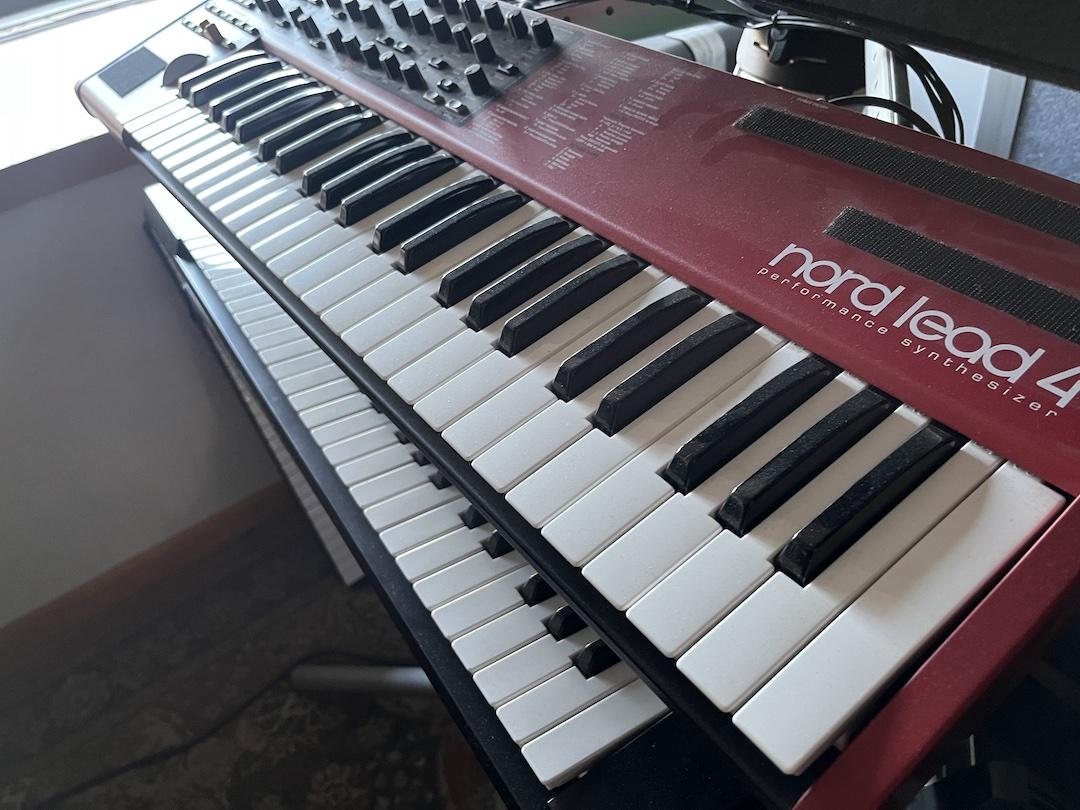
Ah, the Nord Lead 4, the synth I love to hate, and hate to love. This is a ‘virtual analog’ synth
which is marketing speak for “digital” (don’t believe the hype). The keybed sucks, there’s a
plate inside of it that audibly vibrates, the velocity curve is too flat, and the controls all lack
resolution. AND YET, I use it constantly, including oddly enough, for leads; this is despite me
having access to actual analog synths. I have no idea why Nord’s were famous back in the day
besides the fact that Nord’s are red. Complain as I may, I can’t live without this thing; some
synths are like that I guess. Oh, but it does have the best pitch bend I’ve ever used, so I guess there’s that.
Alternatively, you could leverage fewer timbres but each timbre could be more sonically
complex. Instead of using 4 monoaural timbres that are discretely controlled, you could instead
create two stereo timbres with double complexity. In this configuration, each stereo timbre
would have twice the sound-design components available for it so four oscillators, two filters,
and double other things as well. You basically take two of the available timbres and combine
them into one more complicated sound.
In fact you could, if you were so inclined, even have a single monoaural synth with four times
the complexity. Meaning if you wanted to use all the synths oscillators and so on for a single
monaural sound, you could do that too. Not really my cup of tea, but this might be a great
choice to make for certain styles of music.
What you can’t do is all of those options at the same time. You’ll have to pick how you want to
use the synth through configuration. Then given whatever that configuration is, you’ll need to
sound-design and compose accordingly. Because the configuration ultimately manifests itself
through hardware (like connecting cables to the mixer), how you’ll use timbrality isn’t really
something you can switch mid-show very easily. Whatever your decision is, your entire body of
work will be bound to it. Its worth taking your time to figure out what configuration makes sense
for you.
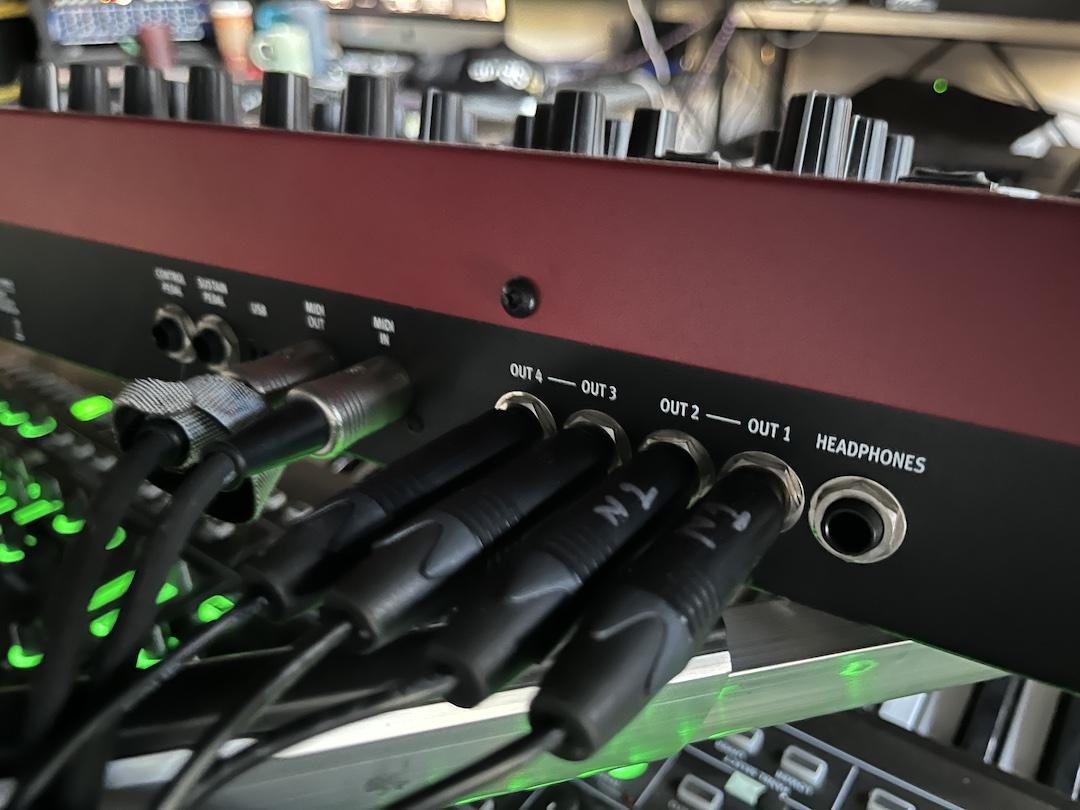
On the rear of the Nord Lead 4 there are 4 outputs. There are many options for how to use
them: 1 mono out, 1 stereo out, 4 mono outs, 2 stereo outs and everything in between. Or I
guess you could just use headphones. Since I use the Nord for leads and sound effects I prefer
to use the 4 mono outs configuration. Your mileage may vary.
Elektron Digitone
The Elektron Digitone is also 4-part multi-timbral, although this synth each timbre is in “stereo”
and you can use the built in chorus and delays to get some nice width. That said there’s only
one stereo audio out so you’ll need to do your mixing in the synth itself and won’t be able to rely
on your mixer. The Digitone however has a pretty significant limitation (in the mk1) which is it
only has 8 voices; a voice is essentially one note playing, if you play a Csus4 (a 3 note chord)
then you’re using 3 voices. Playing 4 distinct sounds with only 8 voices is pretty limiting
espcially if you’re doing big harmonies; if 8 voices are already playing and a 9th sound happens
a voice will be stolen by silencing some other active sound while it is playing. Interestingly, the
Digitone allows you to configure the voice stealing and so you can change the character of the
synth’s limitation to fit your style.
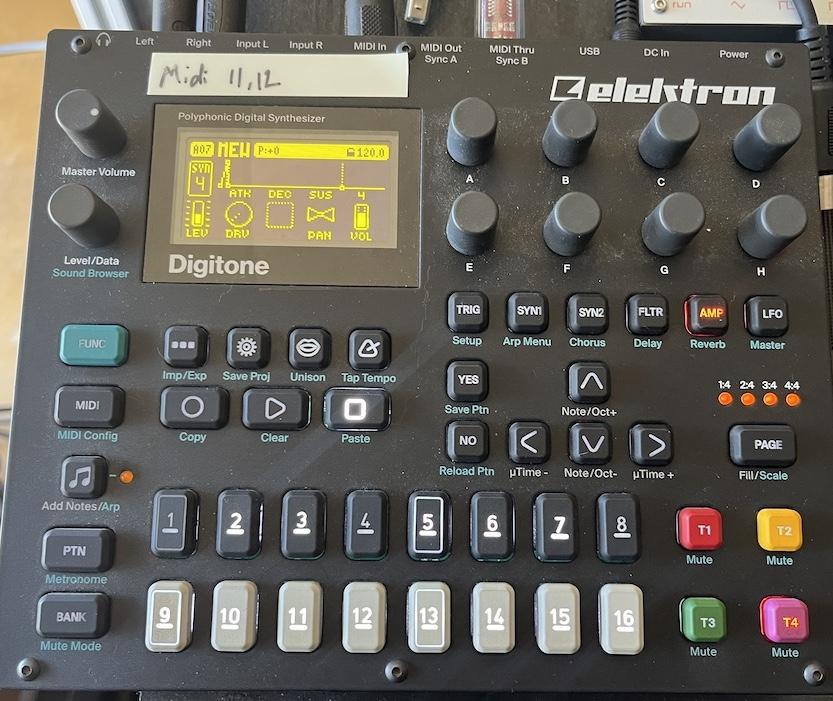
The Elektron Digitone Mk1 is an FM synth; yes the very same FM that your radio uses. I find
FM synths a bit tricky to use but they make some amazing sounds. This synth is 4 part stereo
multi-timbral meaning it can play 4 distinct stereo “sounds” at a time, as long as combined they
don’t use more than 8 voices anyway.
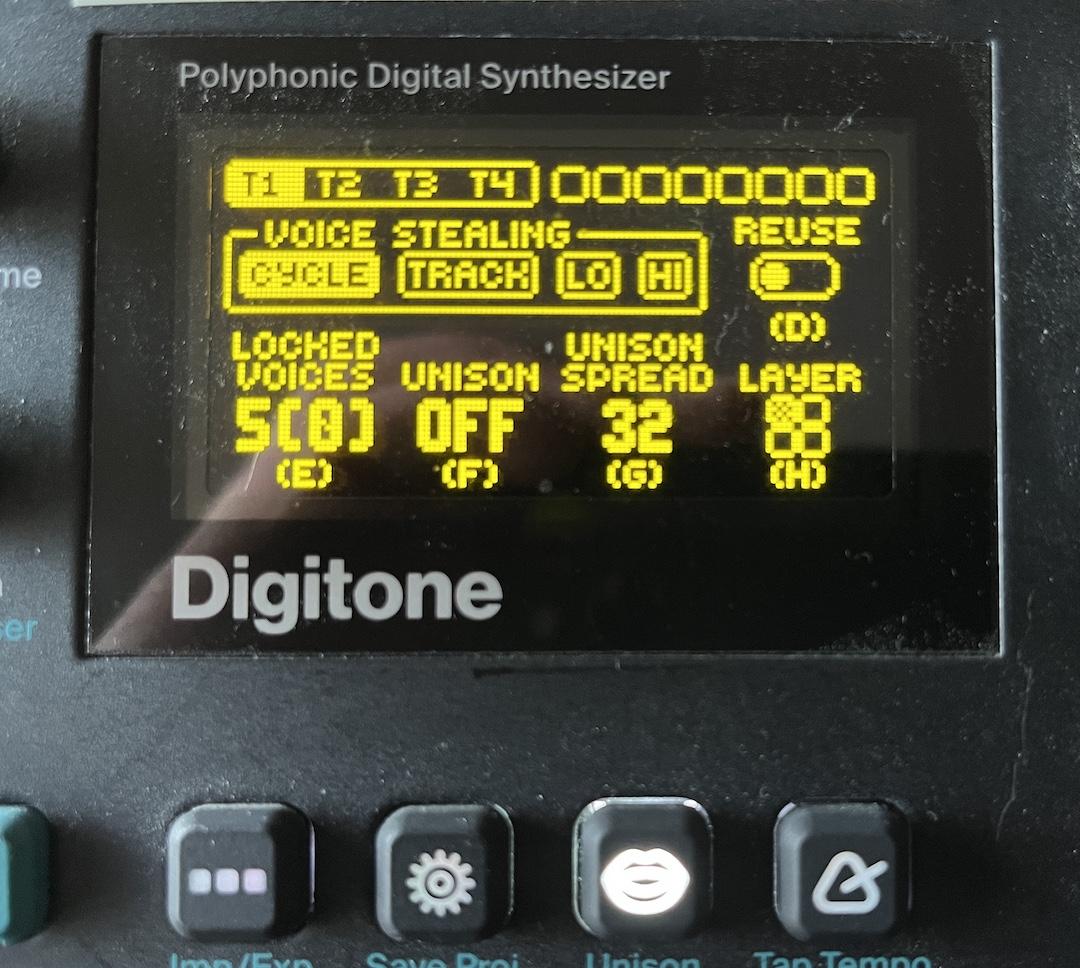
Shown here is the Digitone’s voice stealing configuration. When too many sounds play at once,
the synth performs voice stealing where some actively playing sound is silenced; this can be
really unnerving the first time you notice it happen. Unique to the Digitone you can actually
configure how the voice stealing works. If you’re like me and love playing minor 7th chords,
you’ll likely need to manage your voices wisely.
Food for Thought – The Drum Machine
Drum machines are kind of an interesting case in the world of multi-timbral electronic
instruments. While often thought of as a single unit aka “the drums”, a drum kit is made of up
different “drums” and each drum is its own timbre; drum machines are multi-timbral by definition.
On a drum machine you have to be able to program and design all of the sounds in the whole
kit.
Drum machines also tend to offer a higher degree of multi-timbral complexity. The obvious
aspect of that complexity is that a drum machine usually has to represent many sounds; that’s
kind of what it does. In addition to just having many sounds, a drum machine may have unique
sound-to-sound relationships; one example of this kind of relationship is called ‘muting’ where
one sound will mute another sound when it plays, this is often used for open/closed hi-hat
realism. And finally, within that complexity many drum machines offer “kit-wide” effects
processors, and you can remotely control those effects too.
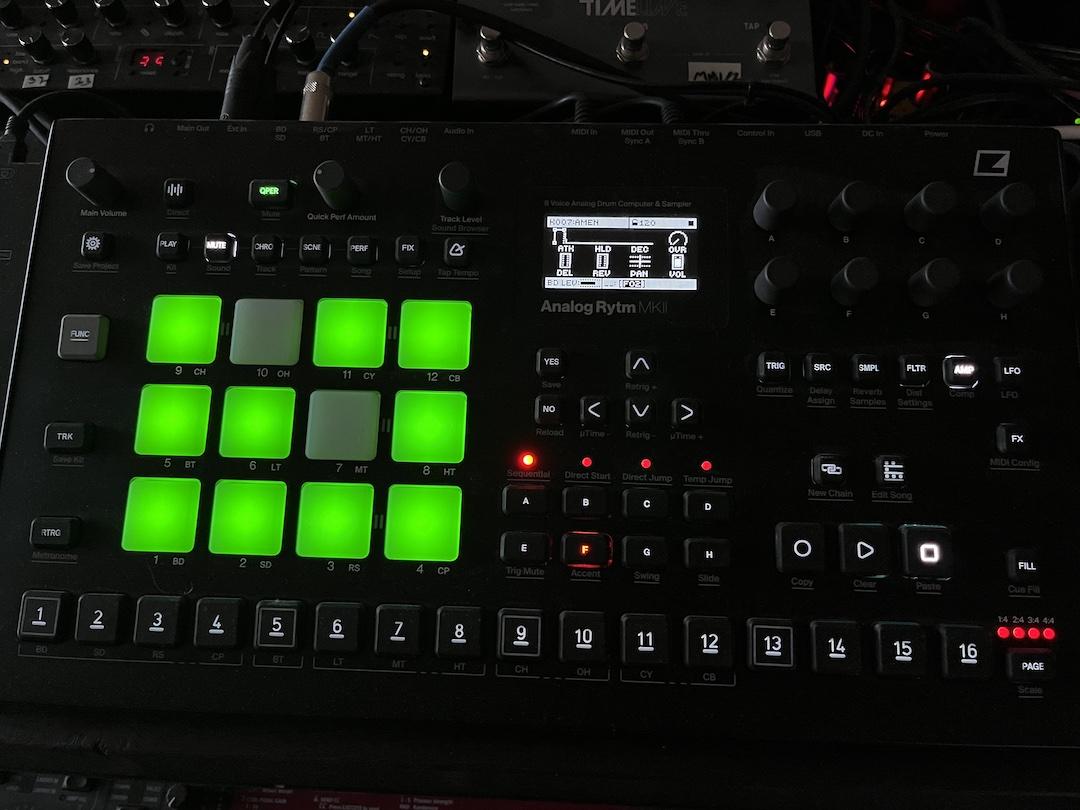
The Elektron Rytm Mk2 – there are 12 independent timbres and another 4 “timbres” dedicated
to effects or other kit-wide settings. Controlling the Rytm fits within MIDI’s single cable
limitation; you can hook your sequencer up to this drum machine and do everything you need to
do. Should you?
While you most certainly can hook your sequencer up to a drum machine like the Rytm, it’s kind
of a lot to ask. To control something like the Rytm you would need to dedicate 16 distinct data streams
or channels and what I haven’t told you is that this is the maximum for a cable.
My sequencer, the Pyramid, has two hardware midi outs so remote controlling a drum machine
such as the Elektron is 50% of my sequencer capacity. Can I live with this limitation? Is it worth
it?
Not to mention, with such multi-timbral complexity, the drum machine may offer an opionated
way to program it that may present some benefits. I’m getting ahead of myself though, stay
tuned for more on this.
Drum machines are kind of special, and honestly, every machine is special. Don’t just go nuts
with as multi-timbral complexity as you can – experiment, get to know your gear, and find how to
express yourself and leverage configuration to your personal taste. There can be a lot to this
decision making too, and in fact, we’re not really done with this drum machine discussion – so
let’s dive even deeper.
Configuration Case Study: A Tale of Two Sequencers
Sequencers are where we go to compose our musical notes. Whereas the synths are the
instruments in our band, the sequencer is like the musician playing that instrument. Or maybe
sequencers are the conductors. Or maybe sequencers are the sheet music. Okay, I got you,
they’re a bit of all of those (it’s... complicated). Musicians program musical phrases into
sequencers and then the sequencer is responsible for sending control signals to the instruments
which causes the instruments to make sound. Sequencers can be stand-alone devices, and
they are also commonly integrated (built-in) to many synths.

Sequencer to Synth Diagram. The Sequencer sends control data (in this case MIDI) to the
synth. The synth reads that data and decides what sound it is going to make. The data itself is
very crude, you send one message to have the synth start playing at a specified pitch and
another message to stop playing that pitch. If you forget to send the stop message the sound
plays forever which is super fun.
When it comes to sequencers they’re kind of everywhere though not every sequencer is that
useful (to me). The thing to call out here is that no two sequencers work in exactly the same
way and they can create very different musical outcomes (this point I intend to unpack some
more in just a sec). I’m not kidding about them being everywhere either; I have one stand-alone
sequencer, and then at least 8 of my synths have integrated sequencers (I use uh.. 4 of the
integrated sequencers, maybe 5).
Sequencers get kind of complicated if I’m being honest; I’m definitely not going to cover
everything about them here. I did want to talk to you about two of my sequencers though as I
think it highlights hardware constraints with tangible musical impacts. Shown below are two
devices, the Squarp Pyramid which is a stand-alone sequencer (left) and the Elektron Analog
Rytm which is a drum machine (right). In the previous case study I briefly mentioned that the
Elektron Analog Rytm can be controlled externally by leveraging 16 channels of midi, and the
question I want to pose to you: Is this actually what we want to do?
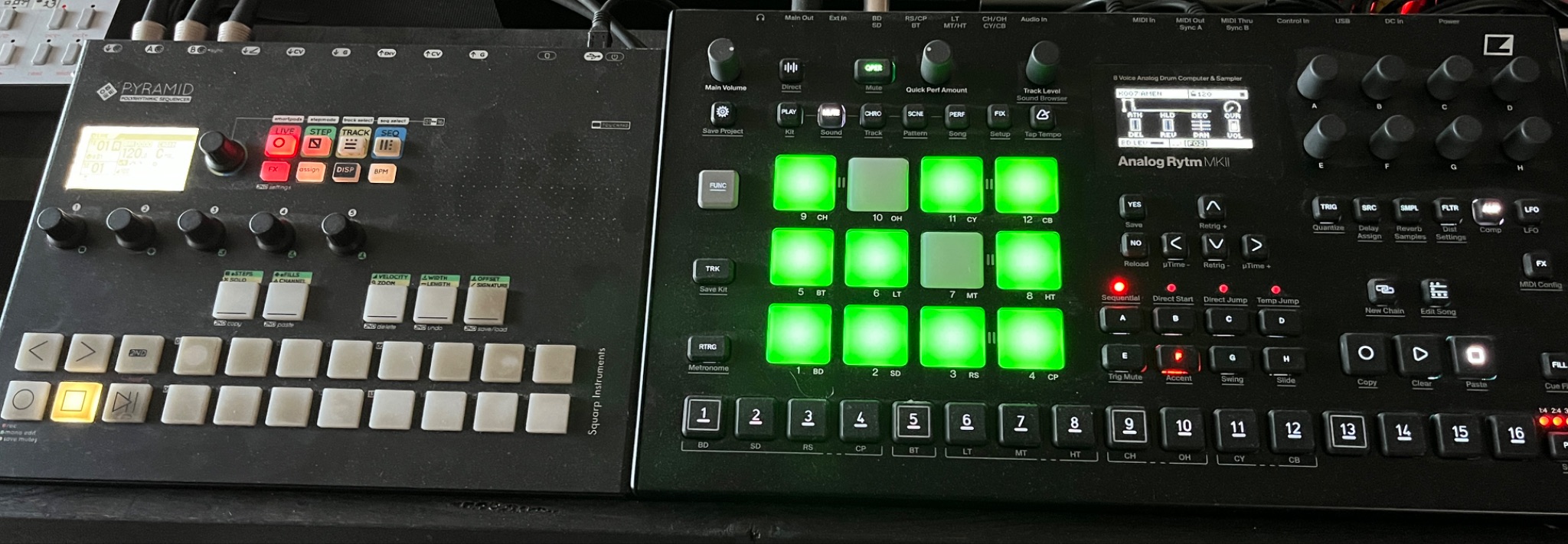
Pictured left is the Squarp Pyramid; this is a stand-alone sequencer meaning sequencing is all it
does and it makes no sounds on its own. I use the Pyramid as the mother-brain for my entire
rig programming 90% of my music in it. To the right is the Elektron Analog Rytm, a drum
machine capable of playing 12 different sounds, among other things. I actually program my
drums on the Rytm directly instead of using the Pyramid for drums, read on to find out why.
In order for us to make a choice about which sequencer we will use to program our drums, you
need to understand the features of each sequencer. It turns out the sequencers between the
two devices are very different and produce very different results. Be warned, I need to nerd
pretty heavily to make this next point, it’s totally cool if you don’t understand each term I use
below but if you’ve got a few hours I’m down to explain them.
Note: Because we’re talking about the drums in particular, I’m going to talk about the Pyramid
as it relates to drum programming and not programming music for other synths.
Pyramid Sequencing Drums:
● Can program drum loops of arbitrary length meaning drums loops could be anywhere
between 1 and 128 bars (or maybe more, its been a while since I read the manual)
● Has cool midi effects like midi lfos and midi delays
● Contains the midi data for most of the other instruments I use so the pyramid is
potentially a 1 stop sequencer shop.
● Can send midi CC data to automate drum parameters and the rytm’s built in effects
(assuming I’m using those).
● Has 2 midi outputs that can provide 16 channels of midi per bus. Driving the Rytm
would require a minimum of 12 channels or almost an entire bus so it is possible to do. I’d still have one whole bus leftover, if only that were enough.
● Can perform midi as loops or as “one-shots” (play the phrase one time and stop)
● Requires a dedicated hardware midi bus (16 channels)
Rytm Sequencing Drums:
● Drum loops can be up to 4 bars.
● Has a unique programming system allowing some notes to happen on specific repeats
of the loop. For example, you can have an extra snare hit play the second time the
fourth bar plays. Yea, it’s a bit to get your head around and you have to learn how to
work in this 4 bar framework.
● Has a unique feature called “retrig” which repeats a drum sound really quickly while also
increasing or decreasing the drum sound’s intensity every hit. This feature is crazy good
for flams, rolls, and making cool shakers out of your hi-hats.
● Can automate any drum parameter when a drum sound plays without using midi
automation which keeps your midi bus clean. This can be really useful, for example you
can use this to swap samples on one of the pads during playback allowing you to have
even more than 12 sounds at a time.
● Has a feature called “random trig” which randomly decides to play the drum at specified
steps.
● By taking advantage of the special sequencer features, a 4 bar loop can be extended to
perform 32 bars or more. At the end of the day however, the loop is still just 4 bars.
The above isn’t an exhaustive list, the point is to show you that the two sequencers have very
different feature sets and they impose differing requirements on how we manage our midi data.
You literally cannot get the same results by programming drums on the Rytm vs the Pyramid;
neither option is formally “better” and your drums will sound different depending on what you
choose. Each method has advantages and disadvantages and it’s up to us to figure out which
of those advantages we have to have and which of those disadvantages we can live with.
Whatever we pick, this element of configuration will be a component of our compositions; if we
change the configuration our compositions change with it. Oh yea, and while I’m here, there are
actually far more than two options for how we can do drums with just the gear I’ve presented,
but I don’t wanna be here all day.
For me I use the Rytm’s sequencer to program drums and not the Pyramid. The unique
features in the Rytm sequencer are so good for drums I honestly can’t imagine programming
drums without them. The disadvantage I tend to feel the most is that I have to smoosh my
programming into 4 bar loops using all these Rytm specific programming techniques. That said,
with clever programming you’d never know I was doing that. I suppose the other disadvantage
(maybe) is that this configuration requires me to perform two sequencers when I’m playing live
instead of one. Since the Pyramid doesn’t control the Rytm I need to perform on both the
Pyramid and Rytm at the same time when I play live; a fact of my rig that ripples outward as I
only have two hands.
Also, because I said I’d explain this a second ago, it’s really impractical to dedicate an entire
Midi bus to one instrument for a couple reasons.
For one this is a ton of midi data and will make managing the performance of other instruments cumbersome.
For two, I need that midi bus to drive all my other (sometimes multi-timbral) synths (of which there are many); we simply don’t
have the midi capacity to dedicate 16 channels to a single instrument.
None of what I said makes my configuration decision “right”, it just makes the decision mine.
And as a result, my music is forever altered by how I’ve configured my rig. Maybe you really
want to program 37 bar drum loops, that’s totally cool too and will make your music sound
different. Whatever we choose, just know that our choice is far more than a checkbox in some
menu, our configuration choice is a self-imposed constraint that fundamentally alters our music.
Wrapping Up
If you’ve made it this far you deserve a heartfelt slow clap; it’s not every day you fire up a blog on
music technology and are greeted with endless philosophy. I love this stuff; I’ve even traveled
around and given talks about musical systems of constraints. As we build our rig, the gear
choices we’re making inform our music. We’re putting ourselves in a box of our own design and that
box uniquely ignites our own creativity. I mean how cool is that?
Everything matters in the synth aesthetic. From our instrument choices to the way we configure our
musical devices to the ways they communicate, each decision is going to add up to a whole that is
uniquely you. Sure, you have to read a lot of manuals to figure everything out but there’s a trick to
it… you just need to learn to enjoy reading manuals.
Thanks for reading friends. I shall see you next time.
About the Author
What’s up yo?
Carl Cosmos produces and performs music as vt100. While he got his start in DAW based
music production, he has focused on dawless electronic music production for the last 15 years
across varied genres. Electronic music rooted in reality and time, through vt100 he pursues a
new authenticity for electronic music.
He often refers to his dawless synthesizer setup as a “spaceship” due to the visible controls;
it currently consists of 26 distinct pieces of gear focused
around analog and digital subtractive synthesis, FM synthesis, and SID (“chip”) synths with the
very occasional sample dropped in for good measure. Currently he is working on vt100’s fifth
studio album Hyperspace and recently enrolled in the Next Level Sound mixing and mastering
program. For more vt100 visit https://vt100dawless.com/
Stay connected with news and updates!
Join our mailing list to receive the latest news and updates from our team.
Don't worry, your information will not be shared.